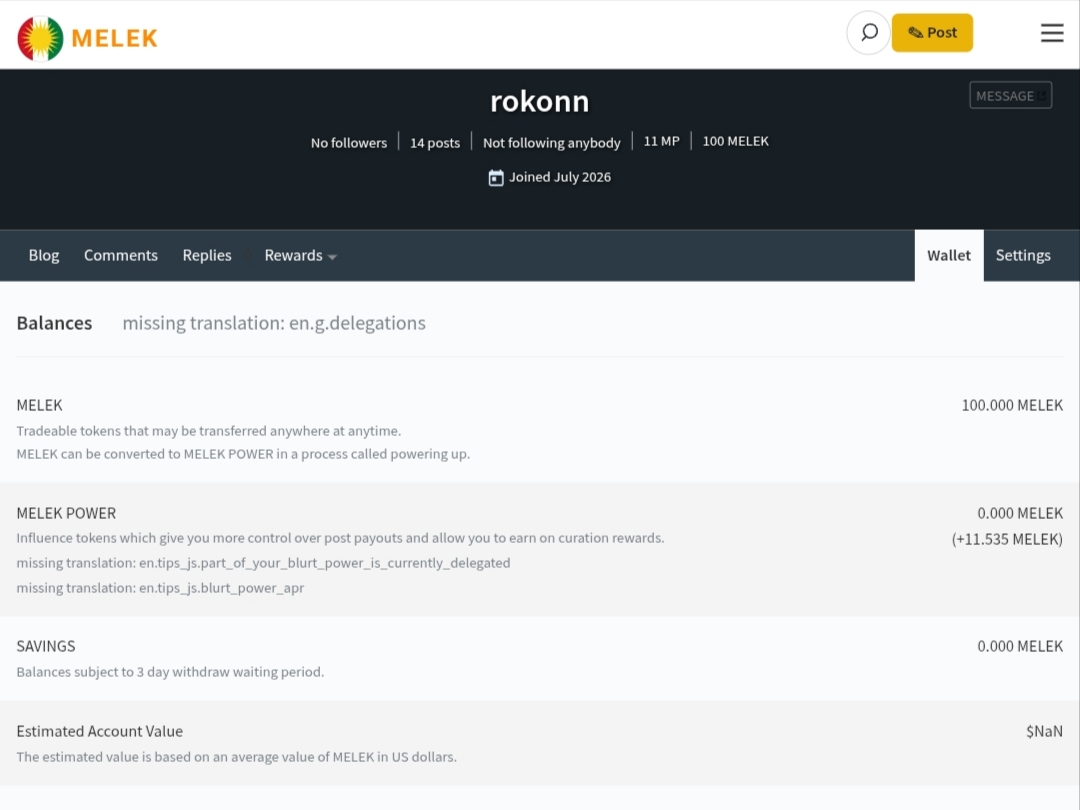
Assalamu Alaikum dear friends, how are you all? I hope everyone is well. Melek has improved even more and it inspires me even more. I am also confused about one more thing, how do I login to my wallet? Here I am not getting any option to power off and there is also no option on how I can power down. I think there needs to be a little more improvement here where we can easily complete the power of process. Because I was originally trying to power up the 100 melek that I had in my wallet but I wasn't able to. Perhaps the authorities will come up with a good solution to this issue.
@rokonn — thank you for writing this up. You found a real bug, and it is fixed.
Why your power up failed. The wallet page was pointed at our test network instead of the main network. It read your balance correctly — that is why you could see your 100 MELEK — but it signed every transaction with the wrong network id and offered the wrong token symbol, so the chain could only reject it. Nothing you did was wrong.
Power down. You were right that there was no way to do it. There is now.
The broken text. The "missing translation" lines are gone — 46 missing labels were added, including every label on the power-down screen. And "Estimated Account Value" no longer shows $NaN; it shows your actual balance, because no price feed has ever been published on this chain and a made-up dollar figure would be worse than an honest MELEK one.
Logging in. Use Login at the top right, or go to melek.salon/login.html. Sign in with your account name and your posting key.
We are early and there is more to fix. Reports like yours are how it gets found — this one was clear enough to act on directly, and it is the reason these are fixed today.
— Hathor